Bape Link Won't Open: Pre-Purchase Safety Guide
By Marcus Feld Editor-in-Chief
| Published | |
|---|---|
| Updated |
When you click a Bape item on fashionreps and get a blank page, endless loading, incomplete product info, or a redirect, don't rush to order or hand the dead link to a buying agent. Your safer goal: confirm three things—are you on the right item, does the page still show enough info to support a purchase decision, and is this just a temporary loading glitch. 🔍 This guide only covers one pre-purchase issue: Bape links that won't open or show abnormal info. It does not rule on whether a specific
Editor score 4.2 / 5
When you click a Bape item on fashionreps and get a blank page, endless loading, incomplete product info, or a redirect, don't rush to order or hand the dead link to a buying agent. Your safer goal: confirm three things—are you on the right item, does the page still show enough info to support a purchase decision, and is this just a temporary loading glitch. 🔍
This guide only covers one pre-purchase issue: Bape links that won't open or show abnormal info. It does not rule on whether a specific link is permanently dead, and it does not replace official customer service for stock, price, or order status. The page check date is October 16, 2026. Always recheck price, stock, size, and item status before actually ordering.

Scope of Link Issues and Stopping Conditions
Common symptoms: clicking a product card returns an error page, the page keeps loading, product name and images won't display, only a title with no specs, or the opened page doesn't match the original card's images, category, and description.
Don't equate "page opens" with "safe to buy." If the product title, images, size, color, seller info, or purchase button are missing multiple key elements, you can't proceed based on just a price or one image. Bape's catalog may include T-shirts, hoodies, shorts, socks, bags, and more—similar names don't mean it's the same item.
Set stopping conditions up front:
- After repeated refreshes, product name and main images still won't show.
- Product card and detail page category clearly disagree.
- Purchase button leads to an unidentifiable page.
- Variants, size, or color can't be selected and there's no verifiable note.
- Page only shows a price with no descriptive info.
- Someone asks you to pay through a non-public channel or provide full payment details.
If any condition applies, save evidence and stop payment. ⚠️
Re-enter the Product Page from fashionreps Catalog
Don't keep clicking the old address in your browser history. Go back to fashionreps' Bape brand catalog, re-search or filter for the target item, then open a fresh product card. This rules out truncated links, incomplete copies, or stale pages.
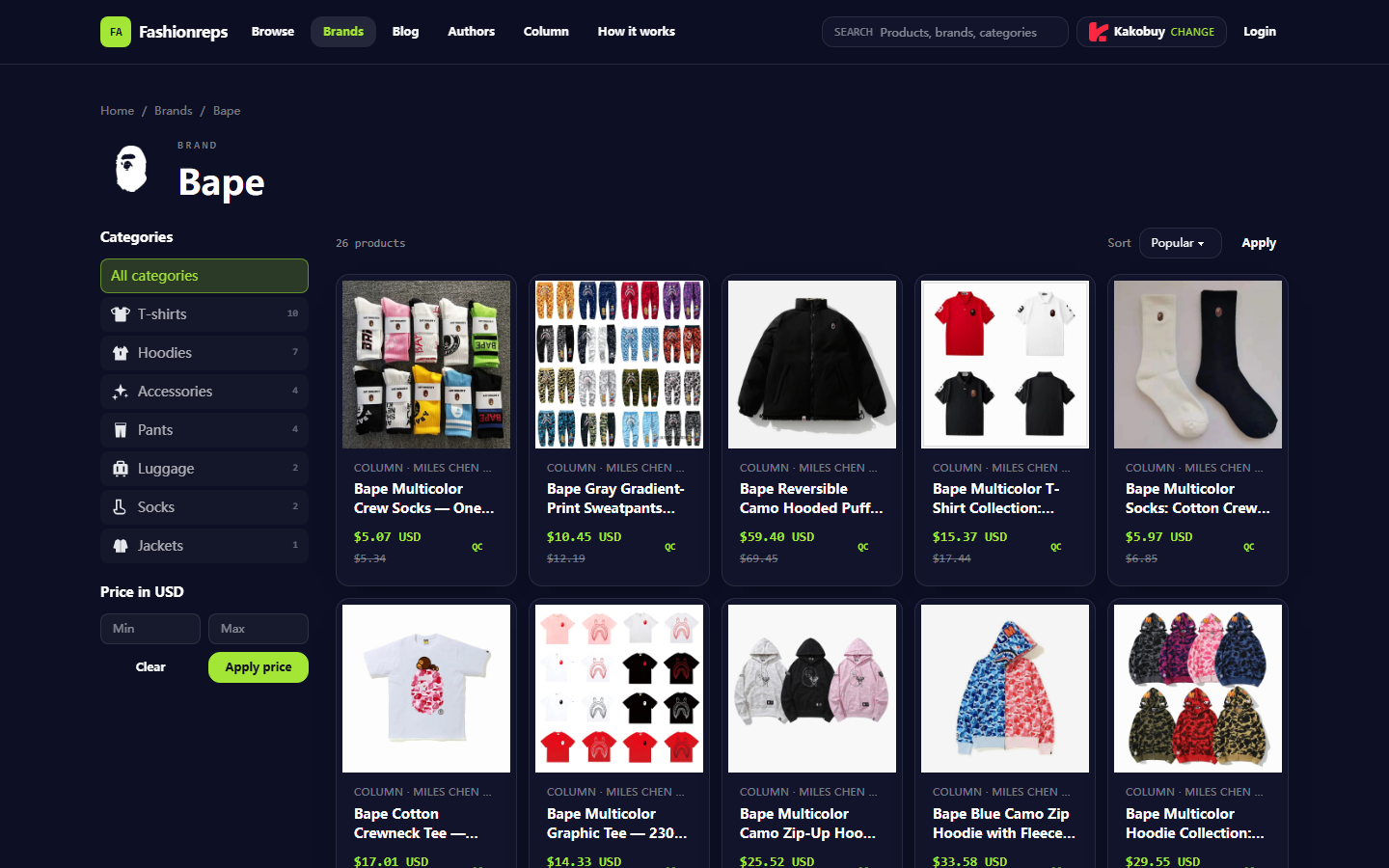
The checked Bape catalog shows 26 items, filterable by T-shirts, hoodies, accessories, pants, bags, socks, jackets, etc. Catalog names and reference prices are only for relocating the item—they don't prove stock, final price, or purchase eligibility.
Follow this order when re-entering:
- Confirm you're on the Bape brand page, not a search-engine cache or third-party redirect.
- Narrow down using unique words from category, color, and name.
- Compare the full name, main image, and displayed price on the product card.
- Only enter the detail page from that current catalog card—don't use copied links from unknown sources.
- If the catalog card itself disappears or shows abnormal info, take a screenshot and stop trying.
If the detail page opens stably from the catalog, proceed to identity verification.
Verify Link, Title, and Product Variants
The core of link troubleshooting isn't checking if the URL looks nice—it's confirming that link, title, and product content point to the same item.
Keep a simple comparison log:
| Check Item | What to Look For | Action on Mismatch |
|---|---|---|
| Link source | Did you enter from the current fashionreps Bape catalog page? | Go back to catalog and reopen; don't use the old address |
| Product title | Do brand, category, color, and style match each other? | Screenshot and pause; don't guess based on the title |
| Product images | Do the category, pattern, and color in images match the title? | Treat as missing info; don't fill in from images alone |
| Variant info | Are size, color, and quantity options clear? | Confirm with official channel; don't submit order yet |
| Purchase button | Does it still point to the displayed purchase flow? | Don't proceed on unfamiliar payment pages |
Watch for title-content mismatches. For example, if the title says green T-shirt, but the description shows a black-and-white zip hoodie with fleece lining, that's not a loading issue—it's data inconsistency. Don't guess size or color in that case.
Check If the Page Still Shows Verifiable Info
Once the detail page loads, confirm it has enough info for the next step. At minimum: recognizable product name, category, main images, and relevant spec or variant details. The page should also clarify the next purchase flow.
Reference prices were checked on October 16, 2026, but prices can vary by platform, buying agent, exchange rate, stock, and time. Reference prices are not final checkout amounts and exclude potential service fees, international shipping, taxes, or other charges. Don't budget from old screenshots. 💰
Use a three-tier check for product info:
- Complete: name, images, category, and main variants are consistent; you can proceed to verify purchase flow.
- Partially missing: you can identify the item, but size, color, or seller info is lacking; ask official support first.
- Contradictory: title, images, and description clearly disagree; stop and save evidence.
A page with only one image and a price is not a complete product page—it can't confirm quality, authenticity, stock, or shippability.
Distinguish Temporary Loading Issues from Missing Info
Temporary loading issues usually mean the page won't display for a short time but recovers when re-entered from the current catalog, with title, images, and specs appearing consistently. Missing info means key fields never appear after repeated attempts, or different spots show contradictory data.
Run a limited check:
- Note the first open time and page behavior.
- Return to the Bape catalog and re-enter the same product card.
- Without submitting an order, refresh once and wait for the page to finish loading.
- Test in an incognito window or another network, but don't bypass security warnings.
- Compare name, category, images, and variants between catalog card and detail page.
If the page recovers and info is consistent, proceed with pre-purchase checks. If it's still blank, redirecting, or contradictory, treat the issue as unresolved—don't keep refreshing. 🔁
Don't mistake clearing cache, switching devices, or repeated clicks for authenticity verification. Those only help judge loading state; they don't prove stock, seller, material, size accuracy, or after-sales eligibility.
Save Evidence for Official Support
Before contacting official or platform support, save the minimum info to help them locate the issue:
- Screenshot of the fashionreps Bape brand catalog page.
- Screenshot of the product card, including full name and visible reference price.
- Error messages, blank areas, or inconsistencies on the detail page.
- Date and approximate time of the issue; this guide's check date is October 16, 2026.
- The page URL shown in the browser, but never share account passwords, payment card numbers, or full order details.
- If shipping or orders are involved, redact name, phone, address, payment info, and full shipping labels.
When asking official support, focus on: Is the page still valid? Has product info been updated? Is the current purchase button usable? Which official page should I re-enter from? Don't ask them to receive payment through unknown channels, and don't mix public product links with private payment demands.
Before sharing screenshots, check for login email, order number, shipping address, phone number, payment info, or personal chats. Crop to only the areas relevant to the link issue. 🔒
When Not to Continue
Don't proceed with order or payment if:
- Detail page won't open stably, even after re-entering from the catalog.
- Product title, images, and category don't match each other.
- Key size, color, or variant is missing and you can't confirm the exact version you want.
- Page asks you to bypass the normal purchase flow or leads to an unidentifiable payment page.
- Someone pressures you to pay but can't explain why the product page failed.
- You can only piece together product info from search snippets, old screenshots, or forwarded content.
Stopping doesn't mean the product is definitely bad—it means current evidence can't support a safe purchase. Saving evidence, consulting official channels, and waiting for page info to recover is usually safer than guessing and ordering.
Final Checklist and Next Steps
Before buying, run through this checklist:
- Did you re-enter the product page from the current fashionreps Bape catalog?
- Do link, title, category, and images point to the same item?
- Are size, color, and other variants clearly visible?
- Does the page load stably, not just once in a while?
- Does the reference price show the check date, and is it not mistaken for final amount?
- Have you saved screenshots of error pages and inconsistencies?
- Have you redacted account, address, order, and payment privacy?
- Did you stop payment and contact official support when info was insufficient?
This guide can help reduce mispurchase risk from dead links, data mismatch, or missing info. It cannot prove product quality, authenticity, stock, or after-sales outcomes. Use it when you've found a target Bape item but the detail page is broken or the purchase path is unclear; don't use it to replace official stock confirmation, size advice, payment verification, or import compliance checks for the destination country. ✅
After verification, if page info is complete and the purchase button is confirmable, proceed to the normal buying agent flow; if any key field is still missing, keep records and wait for official clarification.