cactus plant flea market fashionreps sheet checks
By Marcus Feld Editor-in-Chief
| Published | |
|---|---|
| Updated |
Treat image clues as candidates, not product conclusions When you see cactus plant flea market related images on fashionreps, the most common mistake is merging styles that look similar into one product. A safer approach is to go back to the page to confirm text fields first, then record unconfirmed content separately until images, titles, and SKUs can be matched. The Fashionreps page checked this time is
Editor score 4.2 / 5
Treat image clues as candidates, not product conclusions
When you see cactus plant flea market related images on fashionreps, the most common mistake is merging styles that look similar into one product. A safer approach is to go back to the page to confirm text fields first, then record unconfirmed content separately until images, titles, and SKUs can be matched.
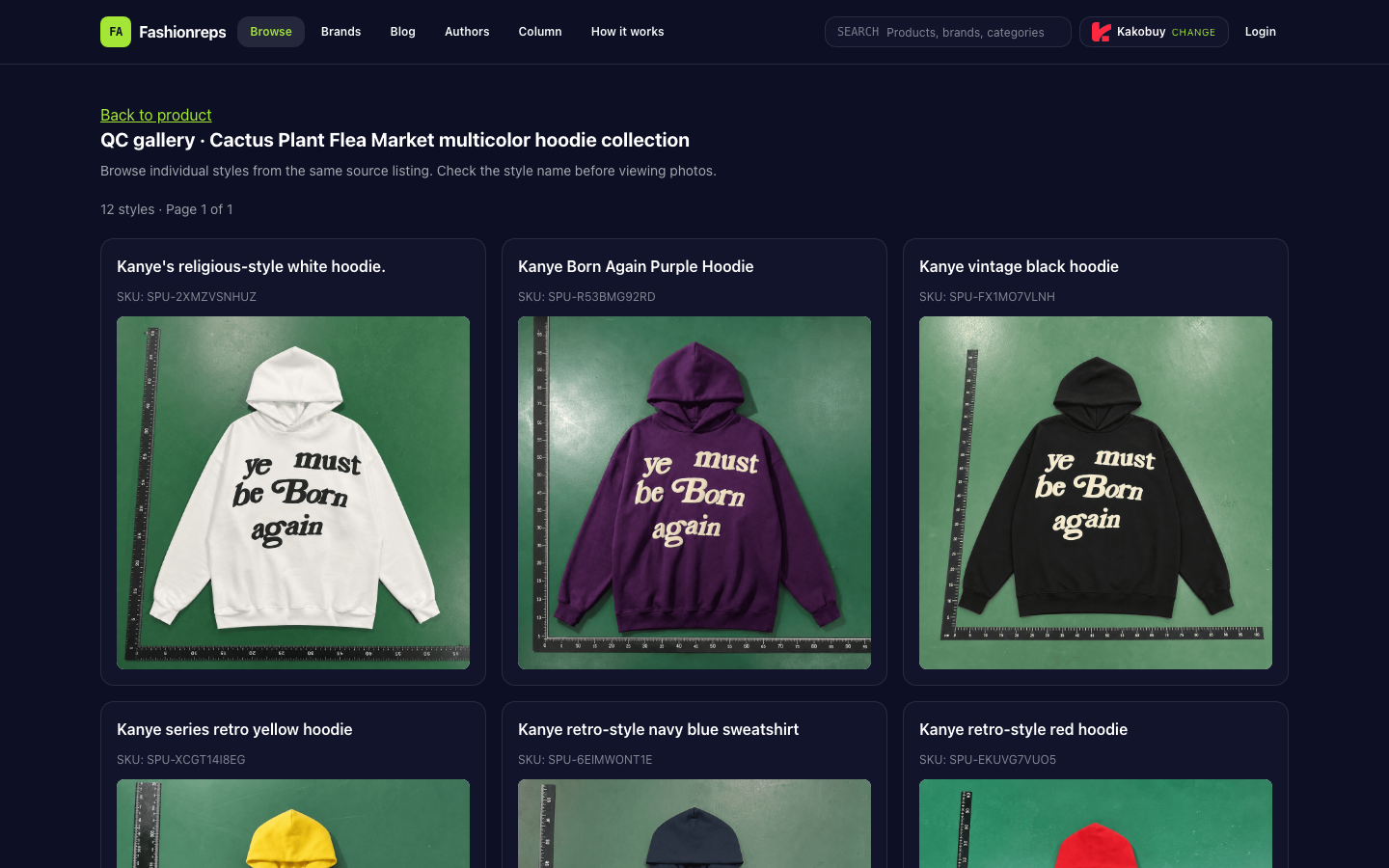
The Fashionreps page checked this time is the QC gallery for the Cactus Plant Flea Market multicolor hoodie collection. The page shows that this source list has 12 styles, and prompts users to check the style name first before viewing corresponding photos. It is suitable for cross-checking images and page fields, but it is not enough on its own to prove price, stock, shipping, or current availability.

Page confirmation: establish style boundaries first
After entering the catalog, first record the scope provided by the page itself:
- Page name: Cactus Plant Flea Market multicolor hoodie collection
- Page type: QC gallery
- Number of styles: 12
- Page prompt: check the style name first, then view photos
- Visible identification fields: style name and SKU
The style names listed on the page do not always appear in a completely consistent naming format. For example, the list includes names such as Kanye Born Again Purple Hoodie, Kanye vintage black hoodie, Kanye retro-style navy blue sweatshirt, and Kanye retro-style red hoodie. They should first be saved as independent records on the page, and should not be merged just because the colors, patterns, or silhouettes are similar.
The page also provides different SKUs for these entries, for example Kanye Born Again Purple Hoodie corresponds to SPU-R53BMG92RD, Kanye vintage black hoodie corresponds to SPU-FX1MO7VLNH, and Kanye retro-style navy blue sweatshirt corresponds to SPU-6EIMWONT1E. SKUs are identification clues on the page, but they still need to be verified together with specific photos and titles.
Cross-check images and text: only confirm what the page actually supports
Each candidate record should be compared at least three times:
- First look at the style name in the list to confirm which entry the current photo belongs to.
- Then look at the color, pattern, and clothing type in the photo to determine whether they match the name.
- Finally, go back to the page to record the corresponding SKU, and keep the original page position or link clue.
If the image shows a dark hoodie and the page title says retro-style black hoodie, you can record it as "page title and visual color are basically consistent." But do not write further details such as specific fabric, silhouette, size, quality level, or purchase status, because the current evidence does not provide that information.
If the image and title are inconsistent, or if the same image may correspond to multiple similar styles, mark it as "to be confirmed." At this point, do not guess the product name from the image, and do not merge multiple SKUs into one candidate.
What Google Sheets is good for saving
The value of Google Sheets is to organize the page verification results into a filterable, collaborative candidate list. It does not replace the fashionreps detail page, and should not become a new source of product facts.
Suggested fields to use:
| Field | Record method |
|---|---|
| Page title | Record the style name exactly as shown on the page |
| SKU | Record the SKU exactly as provided on the page |
| Original page | Save the corresponding page clue, do not rewrite as a custom name |
| Image evidence | Record the corresponding QC image or gallery position |
| Image-text relationship | Consistent, partially consistent, or to be confirmed |
| Suspected duplicate | Fill in records that may be confused with other entries |
| Missing fields | For example, missing price, stock, shipping, or size information |
| Review time | Enter the date of this check |
| Current status | To be confirmed, matched, or paused for submission |
In the sheet, you can use filter functions to view only "to be confirmed" records, or check for duplicate candidates by color, clothing type, and SKU. But these organizing actions only change your working view and do not change the original content on the fashionreps page.
What information should stay on fashionreps
The style names, SKUs, image order, and gallery context on the page should be based on the fashionreps page. When conflicts arise, do not overwrite page fields with abbreviations from your sheet.
For example, you can add an "internal notes" column in the sheet and write "may duplicate the black style," but do not change the page's displayed name to "black classic style." The former is a judgment pending review, while the latter is easily misread as a page fact.
Similarly, price, stock, shipping, size, and purchase availability cannot be inferred from QC images. If the page does not clearly provide such information, mark "not provided on page" in the missing fields instead of filling in estimates.
Return to the detail page to complete the review
After finishing the sheet, go back to the original page for each record to review:
- Does the page title in the current row exactly match the page display?
- Does the SKU belong to the current style, not an adjacent style?
- Does the image really belong to that style, not another image from the same source list?
- Do suspected duplicates have enough text fields to distinguish them?
- Are missing fields still without a reliable source?
Only when the title, image, and SKU correspond to each other can the status be changed to "matched." If conflicts remain, keep it as "to be confirmed" and pause submitting or recommending it as a definite product candidate.
One actionable judgment standard
You can process each record in the following order:
- Has a page title but no clearly matching image: keep as to be confirmed.
- Has an image and a similar title but no unique SKU: do not merge with other records.
- Has a title, image, and SKU that correspond to each other: mark as matched.
- Lacks price, stock, or purchase status: continue marking as missing, do not make purchase conclusions.
- Finds multiple candidates that may belong to the same style: keep independent rows and reference each other in suspected duplicates.
After this division of labor, fashionreps provides page context, titles, SKUs, and image evidence, while Google Sheets saves the verification process, filters to-be-confirmed items, and supports collaborative review. Images can only be part of candidate identification, not a replacement for page text, and cannot turn unconfirmed speculation into product facts.