Clinique Beauty Devices: Agent Specs, QC, and Fee Comparison
By Marcus Feld Editor-in-Chief
| Published | |
|---|---|
| Updated |
This comparison isn't about determining which agent is cheaper. It's about confirming what information is visible and what still needs verification for the same Clinique candidate product across different purchasing channels. This is useful when you've found a candidate link on fashionreps, you're about to choose an a
Editor score 4.2 / 5

This comparison isn't about determining which agent is cheaper. It's about confirming what information is visible and what still needs verification for the same Clinique candidate product across different purchasing channels. This is useful when you've found a candidate link on fashionreps, you're about to choose an agent to place the order, but you're unsure whether the product specifications, QC photos, service fees, and warehouse processes can be consistently verified.
After reading, you should be able to do three things: confirm whether the candidate product actually corresponds to the intended style; record product facts, QC evidence, and fee items separately; and pause the comparison when there's insufficient information to avoid buying the wrong item due to similar page names. This article does not apply to beauty device purchase decisions that require medical certification, efficacy guarantees, or professional skin diagnosis.
Defining the Platform Selection Task for Clinique Beauty Devices
First, settle on one candidate. Don't compare multiple similar-looking Clinique products at the same time. Record the product name, style or model number, page SKU, product link, target agent, and destination country. If the page lacks a clear model number, functional description, or images sufficient to identify the product, it cannot be treated as a comparable sample.
The fashionreps page serves as a product discovery platform, displaying source information and providing QC entry points. The page simultaneously shows multiple agent options, and the Buy button redirects to the corresponding external platform based on the selected agent. Orders, payments, and shipping are handled by the external agent, so the fashionreps page itself cannot substitute for the agent's real-time quotes, inventory confirmation, or after-sales terms. 🔎
Verifying Functions, Dimensions, Accessories, and Links on the fashionreps Product Page
Check the candidate page item by item:
- Does the product name match the Clinique target category?
- Is there clear style, model, capacity, or version information?
- Does the page list dimensions, materials, accessories, and packaging contents?
- Do the product images help distinguish different colors, sets, or generations?
- Does the link open to a page that still shows the product name and valid content?
- Does the page provide QC photos for that specific candidate, not photos for other styles from the same source?
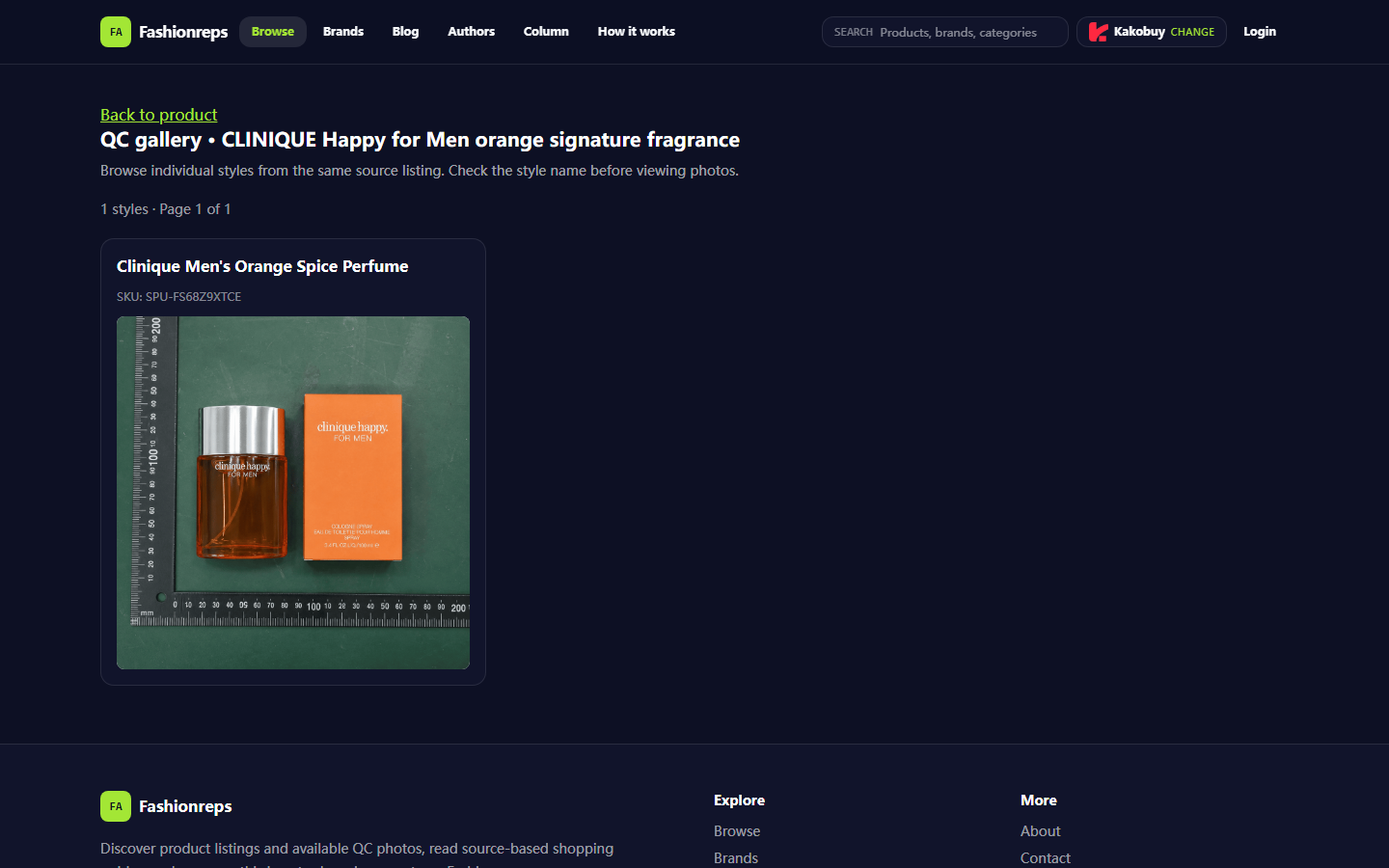
The currently visible QC page shows the product name as Clinique Happy for Men orange signature fragrance and lists one style: Clinique Men's Orange Spice Perfume, SKU SPU-FS68Z9XTCE. This page appears to be for a fragrance candidate, not something that can be directly inferred as a beauty device, cleansing device, or other electronic beauty product. If your target is a beauty device, first confirm whether the candidate page actually belongs to the device category. Do not continue comparing based solely on the Clinique brand name.
The page also indicates that the same source may contain multiple styles, so before viewing QC photos, you need to verify the style name. If the style name doesn't match, the photos cannot be used as evidence for the target product. 📷
Recording Other Agents' Product Confirmation for the Same Link
When selecting another agent, you must use the exact same candidate link, style, and destination country. Do not compare the fashionreps product page with another agent's search results page, and do not put quotes for different product versions in the same row.
For each platform, record:
- Agent name and how you accessed it.
- Product title, model, or SKU shown on the external page.
- Product price, inventory status, and quote time.
- Whether product images matching the target style are visible.
- Whether warehouse receiving, inspection, or photography services are described.
- Whether login is required to confirm price or shipping.
- Whether the page redirects, has missing content, or is inaccessible.
If an agent can only confirm the product via a logged-in page and you haven't completed login verification, mark it as unconfirmed. Do not use the product information from the fashionreps page as a substitute for that agent's confirmation. 🧾
Comparing the Visible Scope of Images, Spec Fields, and QC Evidence
QC photos can help confirm appearance, labels, packaging, and obvious damage, but they cannot alone prove the device's output power, battery life, certifications, material composition, or actual efficacy. For electronic beauty devices, you should also require the page to provide model number, input voltage, charging interface, accessory list, and applicable power conditions.
The currently visible information is only sufficient to confirm a Clinique men's fragrance candidate and its QC page entry. It cannot be used to infer the functions, dimensions, accessories, or performance of a beauty device. There is also insufficient evidence to confirm that different agents have independently inspected the same device. Therefore, when comparing, keep the following separate:
| Check Item | Available Evidence | Evidence Still Needed |
|---|---|---|
| Product Identity | Page name, style name, SKU, QC page | Whether target is a beauty device, model consistency |
| Appearance & Packaging | QC photos matching target style | Multiple angles, full accessories, packaging integrity |
| Functions & Specs | Spec fields explicitly listed on page | Power, interface, voltage, certifications, actual function |
| Agent Confirmation | Agent selection entry and external redirect | External product page, inventory, real-time quote |
Each piece of evidence only supports the scope it explicitly shows. Seeing packaging photos does not confirm that all internal accessories are included; seeing a product name does not confirm inventory; seeing a QC page does not mean the device has passed safety or efficacy tests.
Separately Checking Payment, Service Fees, Warehouse, and Packaging Information
Fee boundaries should be broken down into separate items rather than comparing only the product price:
- Product amount: the page price of the target product itself.
- Agent service fee: purchasing, processing, or other platform service items.
- Domestic shipping: cost from seller to warehouse.
- Warehouse fees: receiving, photography, inspection, storage, or other optional services.
- Consolidation fee: operational cost when combining multiple packages.
- International shipping: calculated based on destination country, route, weight, or volume.
- Taxes and customs fees: determined by destination country rules, declaration information, and carrier route.
- Payment-related fees: exchange rate differences, payment channel fees, or top-up fees.
At present, real-time quotes from different agents, destination country, package weight, volume, and route data are not provided, so it's impossible to calculate which has a lower total cost. The agent selection feature listed on the fashionreps page only indicates that different redirect options exist; it does not prove that service fees, warehousing policies, or international shipping costs are the same across platforms. 💰
Building a Platform Fact Comparison Table with the Same Candidate
Before information is complete, you can create a blank comparison table to avoid writing speculation as conclusions:
| Item | fashionreps Visible Info | Info Needed from Other Agents | Comparison Status |
|---|---|---|---|
| Product Identity | Clinique candidate name, style, SKU, or QC page info | External product title, model, SKU consistency | Partially verifiable |
| QC | Access to QC page related to candidate | Whether same-style inbound photos and service scope are provided | Incomplete |
| Product Price | Discovery entry, not final quote | Real-time product amount, exchange rate, validity | Unconfirmed |
| Warehouse & Packaging | Cannot be inferred from discovery page | Inbound, storage, photography, consolidation, packaging options | Unconfirmed |
| International Shipping | Cannot be inferred from discovery page | Destination route, chargeable weight, taxes, restrictions | Unconfirmed |
| After-sales | Cannot be inferred from discovery page | Return window, compensation scope, exception handling | Unconfirmed |
Only when each platform uses the same link, same style, same destination country, and similar pricing time does the comparison make sense. If a platform's quote requires login, or the page is not reliably accessible, keep it as pending verification.
Distinguishing Page-Visible Facts, Editorial Judgments, and Unconfirmed Functions
Page-visible facts include product name, style, SKU, existence of QC page, and agent selection options displayed on the page. Editorial judgment is: this information is sufficient to help filter candidates but not enough to support conclusions about beauty device functions, performance, or total cost. Unconfirmed functions include power, modes, certifications, battery life, waterproof rating, and actual effects of beauty devices; none of these can be inferred from brand name or ordinary product images.
Also avoid mistaking an agent's presence for platform endorsement. fashionreps provides product discovery and external purchase entry; payment, warehousing, logistics, and after-sales of external agents must be independently confirmed on their respective platforms. Before purchasing, save the page title, style, SKU, quote time, and key fee descriptions for future verification. ✅
Pausing Comparison and Next Steps When Information Is Insufficient
Based on current evidence, the safest conclusion is: you can continue to verify the product identity and QC page of the Clinique candidate, but you cannot yet make a definitive comparison of beauty device specifications, QC completeness, agent service fees, or final landed cost.
Suggested next steps in order:
- Confirm whether the candidate is indeed a beauty device, not a fragrance or other Clinique product.
- Save the target style name, model, SKU, product images, and QC page information.
- Open the same link in at least two agents and check whether the product title and style are consistent.
- Record separately the product price, service fee, warehouse fee, consolidation fee, international shipping, and possible taxes.
- Ask about destination route restrictions, electronic device shipping conditions, and after-sales handling boundaries.
- Only decide to consolidate or split packages after the total cost and evidence scope are clear.
Consolidation may reduce duplicate first weight or some operational costs, but it may also increase package value, volumetric weight, and single-loss risk; splitting may incur more fixed fees but can lower per-package value or address route restrictions. Without weight, volume, route, and fee samples, do not promise that a certain option will definitely save money.
If final verification shows that consolidation saves a clear amount, also record the increased risks, applicable user profiles, and conditions under which consolidation is not recommended. For example, it's suitable for buyers with many orders, permissive routes, and tolerance for centralized loss risk; it's not suitable for high-value single items, fragile devices, items with batteries, or orders that need to spread customs risk.