Corteiz: Spreadsheet vs Google Sheets Checks
By Marcus Feld Editor-in-Chief
| Published | |
|---|---|
| Updated |
Introduction This verification guide is for readers preparing to organize corteiz product information, compare color options, or confirm whether product links are still working before placing an order. The goal is not to judge whether a particular item is worth buying, but to build a reviewable record: which product name corresponds to which color, whether the link opens, when the page information was checked, and what still needs confirmation from a shopping agent or seller. This article uses t
Editor score 4.2 / 5
Introduction
This verification guide is for readers preparing to organize corteiz product information, compare color options, or confirm whether product links are still working before placing an order. The goal is not to judge whether a particular item is worth buying, but to build a reviewable record: which product name corresponds to which color, whether the link opens, when the page information was checked, and what still needs confirmation from a shopping agent or seller.
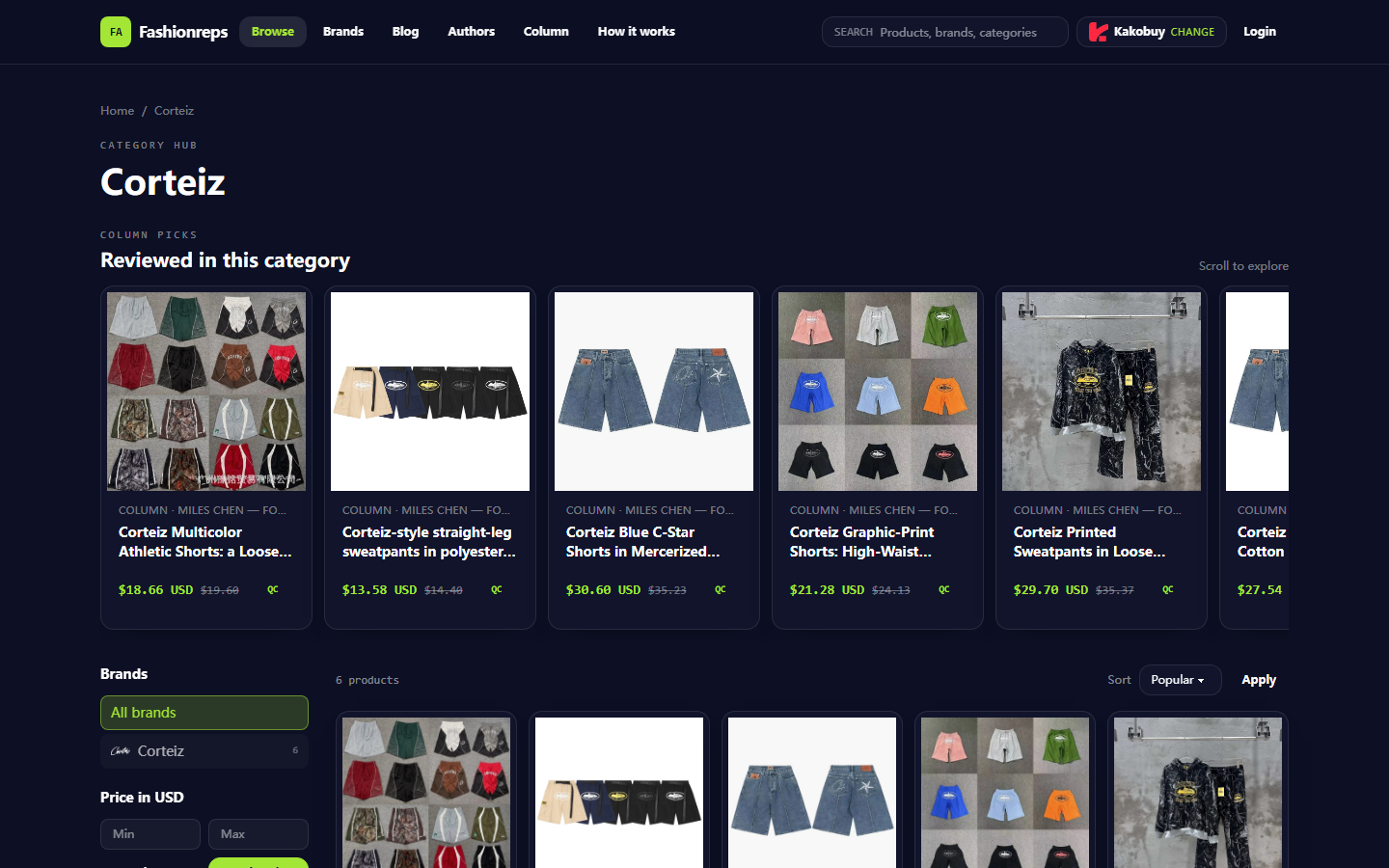
This article uses the Fashionreps Corteiz category page visible on October 22, 2026 as the sample page. The page shows 6 products in that category and provides product cards, prices, brand filters, price filters, sorting, and entry paths to detail pages. Product prices, stock, sizes, materials, seller information, agent availability, and shipping costs may change and cannot be recorded as current facts based solely on the category page. 🧾
Define the verification tasks and evidence boundaries for the corteiz product catalog
The verification task can be broken down into four specific actions:
- Confirm whether the product name on the card matches the target product.
- Record the color, size, material, or style descriptions clearly shown on the page, without treating speculations from the title as seller-confirmed information.
- Open the product detail page to check whether the link works properly and whether the detail page still has enough information to support the next judgment.
- Record the verification date in a spreadsheet and distinguish among page facts, manual notes, and fields to be verified.
The Fashionreps page is suitable for discovering and browsing products, but the category page is not a complete order record. The visible information on the page can only prove what the page displayed at that time, not the stock, actual shipped color, product quality, or final price. The reference price on the page is also not equal to the price including tax, shipping, or the shopping agent's settlement price.
The bottom of the current sample page states that Fashionreps is used to discover products and view available QC images, and that orders, payment, and shipping are handled by external shopping agent websites. Therefore, after verifying colors and links, it is still necessary to confirm purchase availability, selectable specifications, costs, and shipping restrictions on the actual agent page. 🔎

Verify the visible brand, category, and product fields in the fashionreps website-style Spreadsheet
On the Fashionreps Corteiz category page, the page shows the brand filter as Corteiz with a total of 6 products. Visible products include multicolor sports shorts, straight-leg sweatpants, blue C-Star shorts, graphic print shorts, printed sweatpants, and blue printed shorts.
These names already include some sorting clues, such as color, style, material, or size range, but the strength of evidence varies by field:
- The product name is the title currently displayed on the page and can be used to establish an initial record.
- Color words can serve as colors to be verified, but cannot replace the color options on the product detail page.
- Descriptions like "23 Colorways" or "Four Colorways" indicate the number or range of colors in the page title, not that every color is currently in stock.
- Size ranges like "S–2XL" or "S–XL" are display information on the card, not confirmation that all sizes are still selectable on the agent page.
- reference price is the reference price displayed on the page and should be recorded separately with currency and verification date.
- QC label means the page categorizes the content under QC-related sections, not that personal order quality inspection has been completed.
When creating a spreadsheet for the first time, it is recommended to have one row per product detail page, not one row per color. Only when the detail page explicitly lists color options and requires per-color ordering or verification should one product be split into multiple rows. This avoids mistaking "color description in the product name" for "seller-confirmed color stock."
Set up columns for color, specifications, link, and update time in Google Sheets
Google Sheets is better suited for saving filterable, supplementable, and collaborative verification records. At least the following fields are recommended:
| Field | Content to record | Judgment boundary |
|---|---|---|
| Product name | Copy the product name currently displayed on the page | Do not rewrite it into an official name |
| Brand | Brand visible in page filters or product fields | Do not infer brand ownership from the title |
| Category | For example, shorts or sweatpants | Mark as pending if the page does not clearly classify |
| Color description | Colors explicitly appearing in the title or detail page | Record separately from actual selectable colors |
| Specification info | Visible fields such as size, material, fit | Do not write speculation as seller confirmation |
| Category page URL | Record the catalog or category page where the product is located | Used only for tracing the discovery location |
| Detail page URL | The specific page entered from the product card | Keep the original value and mark status if it fails to open |
| Link status | Opens, redirects, 404, insufficient info, or needs review | Each check should include a date |
| Page update time | Update date explicitly shown on the page | Do not fill in if no date is shown |
| Last verification date | Date of the current manual check | For example, 2026-10-22 |
| Evidence notes | Page facts, screenshot numbers, or pending items | Do not write conclusions that cannot be traced |
"Page update time" and "last verification date" must be separated. If the page does not publicly show an update time, record the last verification date, but do not disguise the manual verification date as the website update time.
For colors, it is recommended to split into at least three columns:
- Page color description: Preserve the original page wording.
- Selectable color status: Seen on detail page, not listed on page, pending on agent page, or cannot determine.
- Manual notes: Record differences in color names, discrepancies between images and text, or items to confirm before purchase.
The benefit of this approach is that future collaborators can see whether a color is directly shown on the page or is a temporary note made by the organizer based on images or names. 🟦
Compare product cards, detail pages, and spreadsheet records row by row
When verifying row by row, it is recommended to follow a fixed order to avoid simply copying the product name into the spreadsheet after seeing it:
- Open the product card from the Corteiz category page.
- Copy the currently visible product name, reference price, and specification descriptions from the card.
- Enter the detail page and confirm whether the page still belongs to the same product, not a blank page, tag page, or unrecognizable redirect.
- Look for fields such as color, size, material, and fit, and indicate whether the field source is the category card or the detail page.
- Record the detail page URL and verification result.
- If placing an order through a shopping agent, separately verify the selectable colors, specifications, stock, and prices on the agent page.
If the category page says "Blue" but the detail page does not clearly show color options, record the color status as "not confirmed on detail page" rather than writing it as an orderable color. If there are discrepancies between page images and text descriptions, keep the discrepancy note and leave final confirmation to the agent page or seller communication.
Do not use one successful link opening as proof that the link is valid long-term. Link status is a time-sensitive fact and should be rechecked before placing an order. The page may still exist, but product details, price, available specifications, or redirect targets may have changed. 🔗
Compare the operational differences between website category browsing and spreadsheet filtering
The two tools solve different problems. Fashionreps pages are for discovering, browsing, and entering product content; Google Sheets is for comparing, filtering, and assigning review tasks across multiple products in the same set of fields.
| Objective | Fashionreps category page | Google Sheets |
|---|---|---|
| Discover products | Browse by category, brand, and product cards | Depends on entered data |
| View page context | Can view cards, sections, and site navigation | Need to save notes or screenshot numbers |
| Filter by brand | Page provides brand filters such as Corteiz | Can filter or sort by brand column |
| Organize by price | Page provides min price, max price, and sorting options | Can compare recorded prices |
| Find by color | Depends on product titles and detail page content | Can filter color description and status columns |
| Collaborate | Need to return to page to review | Can assign fields, add notes, and review dates |
| Judge link status | Open product cards and detail pages | Centrally record open, redirect, or failure status |
Page browsing is suitable for answering "what related products exist" and "how to enter detail pages"; spreadsheet organization is suitable for answering "which products have had colors verified", "which links need review", and "which products lack update time records". Google Sheets will not automatically replace page verification unless users configure additional data scraping or link checking tools; this article does not consider such automatic capabilities as built-in features of the Fashionreps page.
Check product link redirects, page updates, and missing fields
Link checks should record at least the following results:
- Opens and the page displays a clear product name.
- Redirects, but the final page is still the corresponding product detail page.
- Page returns 404 or fails to load.
- Page opens but only contains categories, tags, or empty content, not a valid product page.
- Page opens but lacks visible information to support color or specification judgment.
For valid product pages, also confirm whether it still matches the product name in the spreadsheet. If the name has changed significantly, keep the old record, add the current name, and note in the remarks that the page has changed. Do not overwrite historical fields just to keep the spreadsheet tidy, because old records help determine when information changed.
Price and update time should also be handled separately. When the page displays a reference price, record the currency indicated on the page, such as USD, and keep the original price and current check date. If the page does not clearly show an update time, fill in "not shown"; do not infer the product update time from the year at the bottom of the page or article publication time.
If a product lacks color, size, or link information, mark "not shown" or "pending" in the missing field. Blank cells are easily mistaken for not yet entered, while explicit statuses are better for future collaboration. 🕒
Distinguish among page facts, manual notes, and information to be verified on the target site
The three types of information most easily confused in a spreadsheet are:
Page facts are content that can be directly seen on the current page, such as product card names, the number of products displayed on the category page, reference prices, and filter entry points. When recording, preserve the original text as much as possible or accurately paraphrase, and include the verification date.
Manual notes are additions made by the organizer for ease of comparison, such as "title color differs from detail page color name", "this product needs to enter the agent page to confirm stock", or "images alone cannot prove material". Manual notes are helpful but cannot be disguised as seller statements.
Information to be verified is content for which current evidence is insufficient and must be confirmed in the next step, such as actual stock, final color, available sizes, whether the seller accepts returns, shipping costs, taxes, customs requirements, and whether QC images correspond to the current order. Information to be verified should remain open until new evidence from the page, agent, or seller is obtained.
You can add an "evidence level" column in Google Sheets:
- A: Clearly displayed on category page or detail page.
- B: Clues from page title or images, but still need detail page confirmation.
- C: Manual judgment or organizer notes.
- D: Pending confirmation from agent, seller, or order process.
This layering does not increase product authenticity, but reduces the risk of collaborators mistaking speculation for fact.
Combine both tools to complete the pre-order verification checklist
After initial organization, you can form a pre-order checklist in the following order:
- On the Fashionreps Corteiz category page, confirm that the target product can still be found.
- Open the product detail page and confirm that the page name, category, and visible fields match the spreadsheet record.
- Compare color descriptions, distinguishing between page text, image clues, and actual selectable colors.
- Check whether the detail page clearly lists size, material, or fit information.
- In the spreadsheet, fill in the last verification date, link status, and missing fields.
- Open the actual shopping agent page you use and confirm purchase availability, selectable colors, sizes, current price, and shipping conditions.
- Save the order or product record before placing the order, but do not fill in payment cards, passports, complete shipping labels, or other sensitive personal information in a public spreadsheet.
If multiple products need review, you can filter by "link status" or "evidence level" and first handle rows with failed links, unclear colors, and insufficient detail page information. Do not sort only by price and then place orders directly, because low price does not prove that color, specification, stock, or product information has been confirmed.
Next steps after verification
Verification completion does not mean the product is unconditionally ready to buy. For products with confirmed colors, specifications, and links, the next step is to review current availability, settlement price, shipping costs, taxes, and route restrictions on the shopping agent page. For products with insufficient detail page information, supplement evidence or confirm with the agent or seller first; for products with dead links, keep the failure record to avoid the spreadsheet continuing to treat the old address as a usable entry.
The practical value of this combined method is to reduce duplicate viewing and field confusion: Fashionreps is for discovering and returning to product pages, and Google Sheets is for centrally recording colors, links, verification dates, and to-do items. It cannot guarantee stock, quality, shipped color, or final costs, nor can it replace the shopping agent's order confirmation and after-sales policies.
If you only need to temporarily view a small number of products, using the category page and detail pages directly may be more convenient; if you need to continuously compare multiple colors, multiple products, or collaborate with multiple people, setting up a spreadsheet is more appropriate. It is not recommended to batch copy product information without clear field sources, verification dates, and link statuses, because that will mix outdated prices, dead links, and unconfirmed colors into ordering decisions.
Article images
