How to Vet Yeezy Shoes: Size & QC in Sheets
By Marcus Feld Editor-in-Chief
| Published | |
|---|---|
| Updated |
Break Down the Filtering Task into Two Parts When filtering Yeezy shoes, the website catalog is suitable for confirming candidate models, checking colorway names, entering product pages, and verifying QC images; Google Sheets is suitable for recording foot length requirements, size evidence, QC status, and follow-up tasks. The two serve different purposes, so do not treat the number of models or names in the catalog as a guarantee of fit, nor interpret
Editor score 4.2 / 5
Break Down the Filtering Task into Two Parts
When filtering Yeezy shoes, the website catalog is suitable for confirming candidate models, checking colorway names, entering product pages, and verifying QC images; Google Sheets is suitable for recording foot length requirements, size evidence, QC status, and follow-up tasks. The two serve different purposes, so do not treat the number of models or names in the catalog as a guarantee of fit, nor interpret existing QC images as confirmation that every size and every actual shoe has been checked.

The above image is a structural illustration and cannot be used as evidence of actual items, QC, or personal testing.
Step 1: Build a Candidate List from the Website Catalog
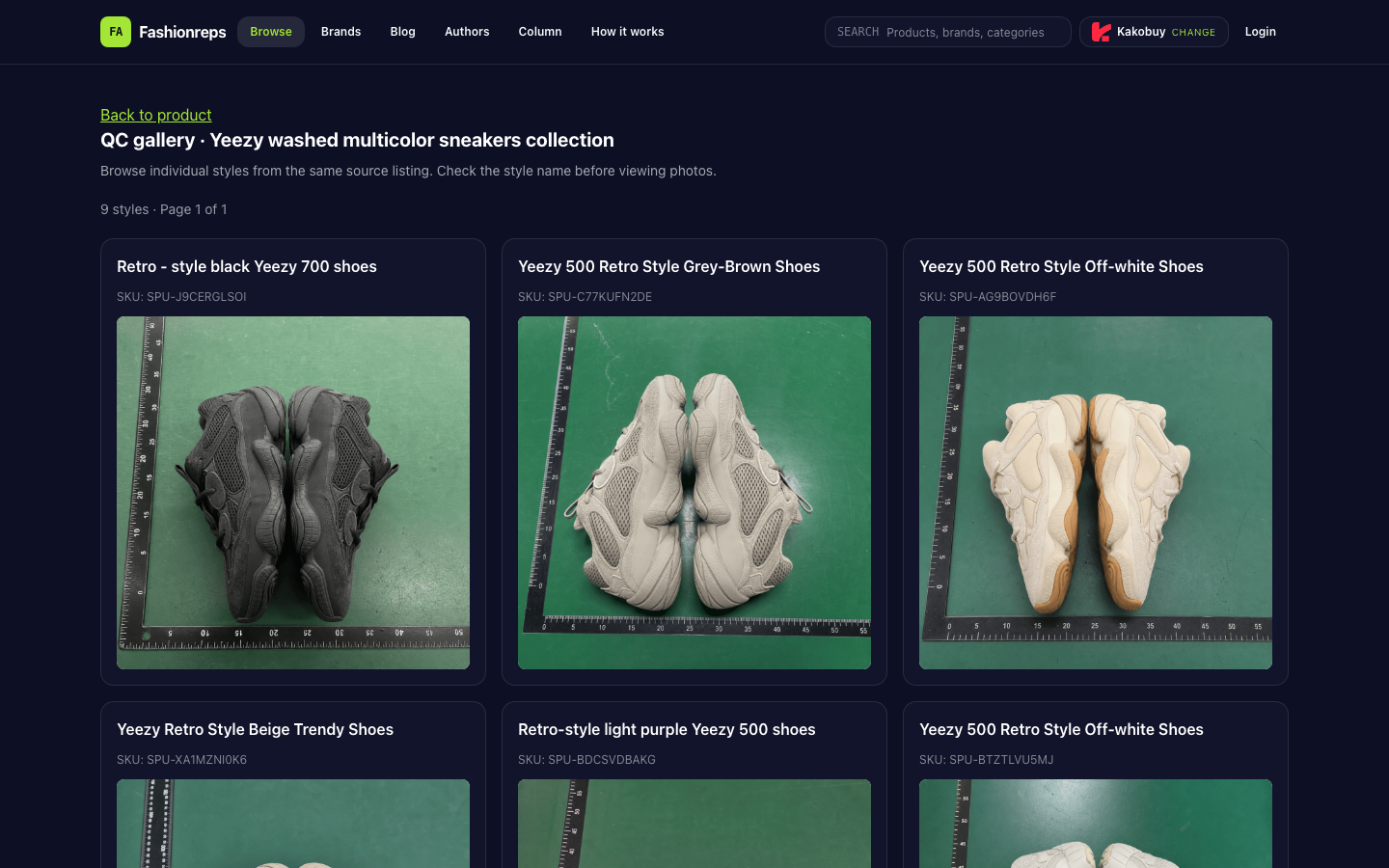
Fashionreps' designated QC page shows that the source listing has 9 individually viewable models, listing a name and SKU for each. The candidates on the page include a black Yeezy 700 style shoe, a gray-brown Yeezy 500 style shoe, off-white and light purple Yeezy 500 style shoes, and orange-brown and gray-brown Yeezy 700 style shoes, among others.
It is recommended to first record only the content clearly displayed on the page:
- Model name shown on the page
- SKU
- Colorway or color description
- Corresponding product page or QC entry
- Whether the page opens normally
- Whether the product images, QC images, and model name belong to the same record
Do not automatically merge similar names. For example, there is more than one off-white Yeezy 500 style shoe on the page; even if the names are close, keep them as separate candidates and distinguish them through SKU and corresponding pages.
Step 2: Check Product Pages and QC Pages One by One
After catalog filtering, open each corresponding page and check whether the following relationships are consistent:
- Whether the model name in the catalog matches the product page title.
- Whether the SKU remains consistent across pages.
- Whether the colorway shown in product images matches the text description.
- Whether the product page has a size entry and whether size information can be clearly recorded.
- Whether the QC page indeed corresponds to the current model, not another model under the same source listing.
- After navigating from the catalog to the product page, whether the return path still leads back to the original candidate record.
The presence of QC images on the page only indicates that the current page provides corresponding QC content; it cannot be inferred that all sizes have the same evidence, nor can it infer inventory, price, shipping, or purchase outcomes. The designated source only provides verifiable information such as model names, SKUs, and QC page structure; this article does not make specific judgments on data not displayed.
Step 3: Use Google Sheets to Manage Evidence, Not Replace Product Pages
It is recommended to use one row per SKU. You can use the following fields:
| Field | Record Content | Purpose |
|---|---|---|
| Model Name | Original page name | Prevent renaming based on impression |
| SKU | SKU shown on the page | Distinguish similar models |
| Colorway Description | Page text and image observation results | Check consistency between text and images |
| Product Page Status | Normal, redirect error, or pending review | Determine whether to continue viewing |
| Size Evidence | Size information shown on product page or screenshot location | Record evidence, not a fit guarantee |
| Foot Length Requirement | Reader's own measurement results | For later size judgment |
| QC Status | Found, missing, pending verification | Avoid treating blank as passed |
| Image Correspondence | Whether product images and QC images correspond | Prevent mixing models |
| Page Update Date | Actual check date | Facilitate later review |
| Pending Information | Unconfirmed content | Form a next-step list |
The size evidence column should record information actually displayed on the page, such as size charts, size options, or screenshot locations. Do not write "this model is in the catalog" as "suitable for a certain foot type," and do not directly convert foot length to a determined size unless the page provides sufficient size basis and the reader has completed necessary measurements.
Step 4: Set Stop Conditions
When encountering the following situations, mark the record as pending review first and do not continue to treat the model as a confirmed candidate:
- The page after clicking the catalog cannot be opened, or redirects to another model.
- SKU is inconsistent between catalog, product page, and QC page.
- Model names are identical or similar, but cannot confirm they are the same colorway.
- Product images clearly do not correspond to text descriptions.
- There is no verifiable size information on the page, but a specific size recommendation is needed.
- QC entry is missing, or QC images cannot confirm the corresponding model.
- Page status is insufficient to confirm whether it is still available for purchase.
The purpose of stop conditions is to preserve uncertainty, not to force a ranking of candidates. For items that cannot be confirmed, write in the "Pending Information" column the page or evidence type that needs to be rechecked.
A More Reliable Filtering Order
First, create a raw list by SKU from the 9 page candidates, then filter out records with inconsistent names, images, or link relationships. Then supplement product page size evidence and personal foot length requirements, and finally check QC status separately. This avoids deciding based on color or model impression first and then looking for evidence afterward.
The final retained candidates should at least meet three points: model name and SKU correspond, there is no obvious conflict between product page and images, and unknown items in size and QC have been clearly marked. If any of these cannot be confirmed, keep it as pending review rather than writing it as verified or a purchase recommendation.
Article Images