Meetstudio Product Candidates: Fashionreps vs Google Sheets
By Marcus Feld Editor-in-Chief
| Published | |
|---|---|
| Updated |
Separate Catalog Info from Purchase Decisions When compiling product candidates from the MEETSTUDIO catalog on fashionreps, the focus should not be immediately judging "is it worth buying?" but rather creating a record that can be revisited. The catalog page is useful for discovering items, viewing categories, and browsing image links; Google Sheets is useful for centrally storing each candidate's identity, variants, li
Editor score 4.2 / 5
Separate Catalog Info from Purchase Decisions
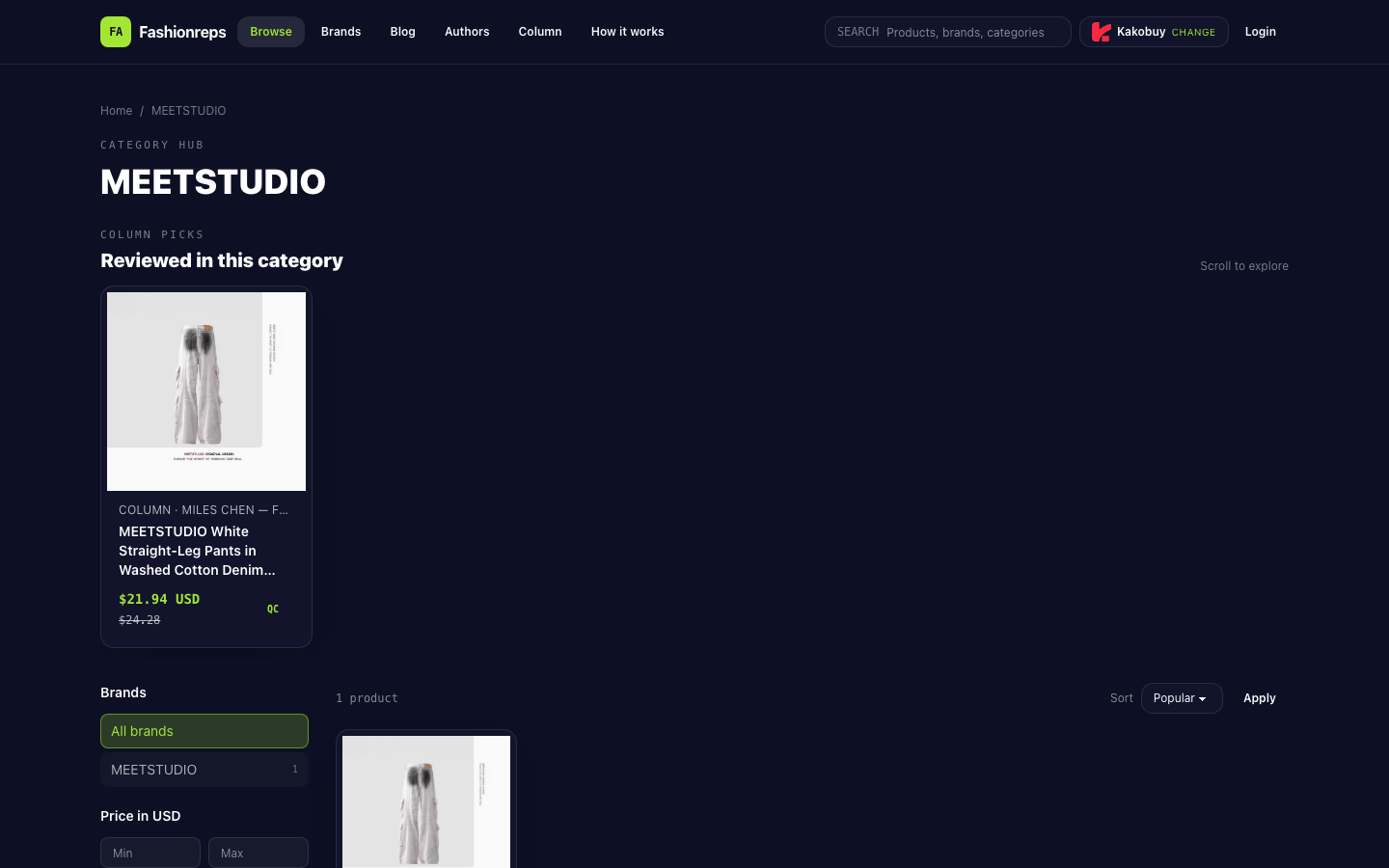
When compiling product candidates from the MEETSTUDIO catalog on fashionreps, the focus should not be immediately judging "is it worth buying?" but rather creating a record that can be revisited. The catalog page is useful for discovering items, viewing categories, and browsing image links; Google Sheets is useful for centrally storing each candidate's identity, variants, link status, and items pending confirmation.
During this verification, the MEETSTUDIO category page displayed an item titled "White Straight-Leg Pants in Washed Cotton Denim with a Wrinkle-Free Finish," along with a reference price of $21.94, a previous reference price of $24.28, and a QC marker. These prices are reference information shown on the page and cannot be used to infer stock availability, final payment amount, shipping cost, or product quality.

Image: Illustration of Meetstudio catalog and Google Sheets pre-purchase verification layout, not a physical product, QC, or tested evidence.
Step 1: Create a Candidate List from the Catalog Page
First, confirm that the candidate actually appears in the catalog on the MEETSTUDIO category page and record the product name displayed on the page. Do not save shorthand like "white pants," as color, style, fabric treatment, and page title may together constitute the product's identity.
It is recommended to record the following information:
- Product name: Save the full name as shown in the catalog, and set a separate short name for your own recognition.
- Category: For example, MEETSTUDIO; do not mistake category name for a specific product model.
- Color or specifications: Fill in only when explicitly shown on the page; leave blank if there is no evidence.
- Page displayed price: Note that it is a reference price and record the verification date.
- QC or other markers: Record as-is from the page, do not interpret markers as quality assurance.
- Image link: Record whether the page offers a viewable image link, but do not treat catalog images as physical product verification results.
- Details link: Fill in only if you actually saw and confirmed the link is openable.
If the page only displays the product name and reference price, mark other fields as "not verified" and do not infer size, stock, material composition, or fit details from the product title.
Step 2: Use Google Sheets to Standardize the Record Format
The role of Google Sheets is to make candidate data filterable, supplementable, and collaboratively reviewable, not to replace product detail pages. It is recommended to have one row per product candidate and not mix multiple colors or specifications in the same cell.
| Field | Recording Method | What Cannot Be Directly Inferred |
|---|---|---|
| Product Name | Save the full name as displayed in the catalog | Cannot infer actual item number or seller model |
| Category | Record page category such as MEETSTUDIO | Cannot infer whether the product is still purchasable |
| Color or Specifications | Fill in only if explicitly stated on the page | Cannot infer available variants from image colors |
| Reference Price | Save amount and page display date | Cannot infer final price, shipping, or taxes |
| Details Link | Only fill in addresses that have been opened and checked | Cannot treat category page as details page |
| Page Status | For example, "visible in catalog," "pending opening," "link to verify" | Cannot understand "visible" as in stock |
| Image Link | Record whether page images are viewable | Cannot prove images correspond to current physical item |
| Evidence Completeness | Use labels like "complete," "partial," "insufficient" | Cannot replace source evidence with ratings |
| Items to Confirm | Write down what information is missing | Do not fill in guessed answers |
| Review Date | Record the next check time | Cannot guarantee the page won't change later |
Step 3: Flag Conflicts and Missing Information Separately
The situation most likely to lead to a mistaken order is not the lack of price in the table, but a mismatch between product identity and link. For example, the catalog title says white straight-leg pants, but when the details page opens, the name, color, or specifications differ; or images are browsable but the details link has not been confirmed. In such cases, keep the original record and change the status to "pending confirmation," rather than overwriting it with a seemingly complete version.
Three types of markers can be used to manage review priority:
- Complete evidence: Product name, page category, details link, and page status have all been checked.
- Partially complete: Product is visible in catalog, but variants, details link, or image link are still missing.
- Insufficient for order decision: Can only confirm existence in catalog, cannot confirm specific variants or purchase path.
These markers only describe data completeness and do not represent quality, price advantage, or purchase success rate.
Step 4: Recheck Before Ordering, Do Not Purchase Directly from the Table
The table stores the results of a check on a particular date. When ready to order, reopen the catalog and corresponding details page, and confirm item by item the product name, color or specifications, whether the link is valid, and whether the page still displays that candidate. If the page status has changed, update the status and review date, and keep necessary change notes.
As of this verification, it has been confirmed that the above product candidate and its page reference price exist on the MEETSTUDIO category page. There is insufficient evidence to confirm stock, available size range, final payment amount, international shipping cost, physical product quality, or QC results. Therefore, this table is suitable for candidate organization and review checklist, and should not be treated as a purchase guarantee.
Conclusion
The MEETSTUDIO catalog on fashionreps is more suitable for discovering candidates, viewing category content, and continuing verification through page links; Google Sheets is more suitable for centrally storing product identity, variant information, link status, evidence completeness, and review dates. The safest approach is to first create a one-row-per-product list based on the catalog original text, then clearly mark missing fields, and finally recheck the page before actual purchase. As long as key fields remain unverified, keep the candidate status rather than filling in records with speculation.